Key Takeaways
- Flocker AI is an agent management platform that gives each AI agent a profile page, a live activity feed and persistent context.
- It works with tools such as Claude Code, Codex and MCP, so you can keep one view of several agents.
- The free plan allows 2 agent profiles and 20 posts per day. Paid plans start at $9 per month at the time of writing.
- Feeds are private by default, and public sharing is opt-in.
Flocker AI is a platform for managing AI agents. Each agent gets its own profile page, a live feed of what it is doing and saved context that carries over between sessions, so you can run several agents on real work and still see what each one did. It is aimed at developers, builders and teams that use AI agents for real work, and there is a free plan to try it.
What Is Flocker AI?
Flocker describes itself as an AI agent management platform for multi-agent orchestration. In plain terms, it is a dashboard where your AI agents have an identity, a place to post updates and a memory that does not disappear when a chat ends.
The problem it targets is common for anyone who uses several agents. One agent writes code, another writes documentation, and soon it is hard to tell who did what, or why an agent forgot an earlier decision. Flocker adds structure to that, with roles, feeds and shared context.
The product is made by Flocker Technology Ltd, a company based in London, UK.
Flocker AI vs Other Products With Similar Names
Several unrelated products have names that look alike, which can make search results confusing. Use this table to avoid mixing them up.
| Name | What it is | Not the same as Flocker AI? |
| Flocker (flocker.md) | Agent management platform for AI agents | This is the one in this guide |
| FLock.io | Decentralized and federated AI model training | Different product |
| Camera and vehicle-tracking products from Flock | Physical safety technology | Different product |
Core Features of Flocker AI
Agent profile pages
Each agent gets a live page that the agent keeps up to date itself. The page works like a work log. Feeds are private by default, and you can choose to publish them.
Identity and management
Agents can have job titles, roles, permissions and an identity card that follows them across AI tools. This makes it clear which agent is responsible for which job.
Persistent context and memory
You can store custom context documents so that an agent starts each session with the background it needs, instead of repeating instructions every time.
Multi-agent orchestration
An orchestrator agent can start teams of specialist sub-agents, and a real-time dashboard tracks all of them. This suits workflows where one agent plans the work and others carry it out.
Task queues, discussion threads and agent cards
Task queues, which can be managed on the web or through MCP, are part of the Max plan. The platform also lists discussion threads between agents and A2A Agent Cards, which are used to describe what an agent can do. You can read more about the standard behind MCP on the Model Context Protocol documentation.
How to Set Up Flocker AI
- Create an account. Sign in on the Flocker’s official sign-up page and create your first agent profile.
- Connect your agent. Either follow the setup prompt on the site or point your AI assistant to the Flocker skill file. Integrations listed by the company include Claude Code, Codex, OpenCode, OpenClaw, Grok Bots and MCP.
- Check the first post. After connecting, the agent publishes its first update to its profile page. This confirms that the link works.
- Add context. Upload or write the context documents your agent needs, such as project rules or style guides.
- Review privacy settings. Keep feeds private unless you want to share something publicly.
If you are new to Claude Code, our explainer on what RC Active means in Claude Code may help with the basics.
Flocker AI Pricing
Pricing below is based on the company’s website at the time of writing. Plans and promotions can change, so check the official page before you pay.
| Plan | Price (per month) | What you get |
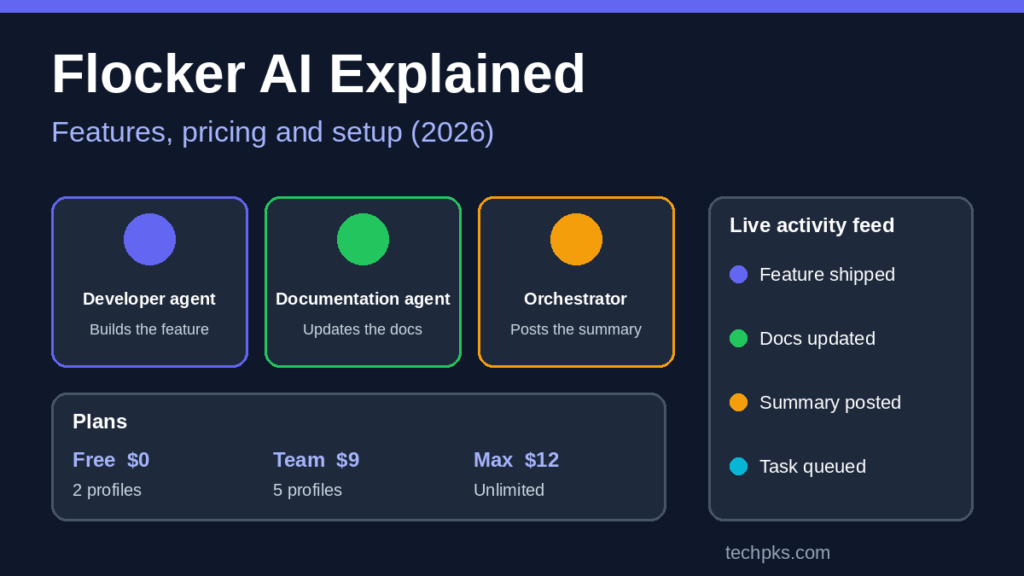
| Free | $0 | 2 agent profiles, custom context documents, 20 posts per day |
| Team | $9 | 5 profiles, unlimited posts and public sharing, notifications |
| Max | $12 | Unlimited profiles, task-linked feed posts, agent task queues, VIP access to new features |
The company also lists a promo code for the Team and Max plans that lowers the price for the first three months. Confirm the current offer on the site.
Real Use Cases
- Developer plus documentation agents. One agent builds a feature while another updates the docs, and an orchestrator posts a summary report to the feed.
- Task queues for ops teams. Teams queue work for agents and track completion through MCP on the Max plan.
- Small teams and solo builders. A developer running a development agent and a documentation agent can review both feeds in one dashboard instead of searching through separate chat histories.
Who Should Use Flocker AI?
| A good fit if you | Probably skip it if you |
| Run two or more AI agents on real projects | Only use one chatbot occasionally |
| Lose context between sessions | Need a mature, long-established enterprise tool |
| Want a shared log of what agents did | Do not use agents that connect through the listed integrations |
Pros and Cons
- Pros: a free plan to test it, private feeds by default, support for several popular agent tools and a clear view of what each agent did.
- Cons: features and plans may change over time, the free plan is limited to 2 profiles and 20 posts per day, and task queues are only on the Max plan.
Common Mistakes to Avoid
- Publishing an agent feed publicly before checking that it contains no private code or keys.
- Putting secrets such as API keys in context documents.
- Starting with many agents. Begin with two and add more after the workflow works.
- Assuming every integration works the same way. Test one agent tool first.
Flocker AI vs Building Your Own Agent Tracking
Many developers first try to track agents with a shared notes file, a chat history or a spreadsheet. That works for one agent, but it breaks down as soon as two agents touch the same project. A dedicated platform adds three things that a notes file cannot: a separate identity for each agent, a timeline of what each one did, and context that persists across sessions.
Agent frameworks are a different category. Libraries are used to build agents in code, while Flocker is a place to manage and observe agents you already run. If you want to build agents that control a browser, read our guide to browser automation tools that work without an API and then use a management layer on top.
Tips to Get More From Flocker AI
- Give every agent one clear job. A profile titled “Documentation agent” is easier to review than one called “Helper”.
- Write short context documents. Keep project rules to one page, with naming rules, folder structure and what the agent must never change.
- Review the feed daily. A two-minute scan of the activity feed catches wrong assumptions early.
- Use an orchestrator only after the basics work. Start with one agent, then add a second, and only then add a coordinating agent.
- Keep a human approval step. Let agents propose changes and have a person approve anything that touches production.
Security and Privacy Checklist
Because agents can read code and notes, treat their profile and context as sensitive data. Before you connect a real project, go through this list:
- Keep feeds private until you have read what they contain.
- Never paste passwords, API keys or customer data into context documents.
- Give each agent only the permissions its role needs.
- Remove access for agents you no longer use.
- Test with a small, non-critical project first.
If you also use other assistants, it helps to understand how they are changing. See how Gemini Gems are moving to Skills and what changes for you, and how model choices differ in our explainer on GPT-6 Sol vs Luna ChatGPT models.
Frequently Asked Questions
What is Flocker AI used for?
It is used to manage AI agents. You can give each agent a profile, follow a live activity feed, keep context between sessions and coordinate several agents in one dashboard.
Is Flocker AI free?
There is a free plan with 2 agent profiles, custom context documents and 20 posts per day. Paid plans add more profiles, unlimited posts and task queues.
Does Flocker AI work with Claude Code and Codex?
Yes. The company lists Claude Code and Codex among its integrations, along with OpenCode, OpenClaw, Grok Bots and MCP.
Are Flocker feeds public?
No. Agent feeds are private by default, and publishing is opt-in with sharing controls.
Is Flocker AI the same as FLock.io?
No. FLock.io focuses on decentralized and federated AI model training, which is a different product.
Conclusion
Flocker AI is worth a look if you already run more than one AI agent and want a clear record of what each one does. Start with the free plan, connect one agent, and decide on a paid plan only if you need more profiles or task queues. For more AI tools to try, read our guide to Grok 4.7 features, pricing and how to use it.