Key Takeaways
- Innovative technology is anything that solves an old problem in a clearly better way, not just anything new.
- The most useful innovations right now are passkeys, on-device AI, Wi-Fi 7, Matter smart homes and GaN chargers.
- Adopt a new technology only if it saves time, money or risk for you in the next few months.
- Check compatibility, security and support before you buy anything labelled “innovative”.
Innovative technology means a tool or system that solves a familiar problem in a clearly better way, such as faster, cheaper, safer or easier to use. In 2026 the innovations that matter most to everyday users are passkeys, on-device AI, Wi-Fi 7, the Matter smart home standard and compact GaN chargers. Below you will find what each one does, who it helps and how to decide whether it is worth your money.
What Is Innovative Technology?
Innovative technology is a new or improved tool that changes how a task is done in a measurable way. A faster chip is an improvement. A passkey that removes passwords altogether is an innovation, because it changes the method, not just the speed.
A simple test helps you tell the difference between real innovation and marketing:
- Does it remove a step or a risk? Good innovations make a task shorter or safer.
- Does it work with what you already own? Technology that locks you into one brand is usually weaker.
- Will it still be supported in three years? Standards and big platforms last longer than one-off gadgets.
For a wider look at how technology shapes daily life, read our article on whether technology has made people’s lives easier.
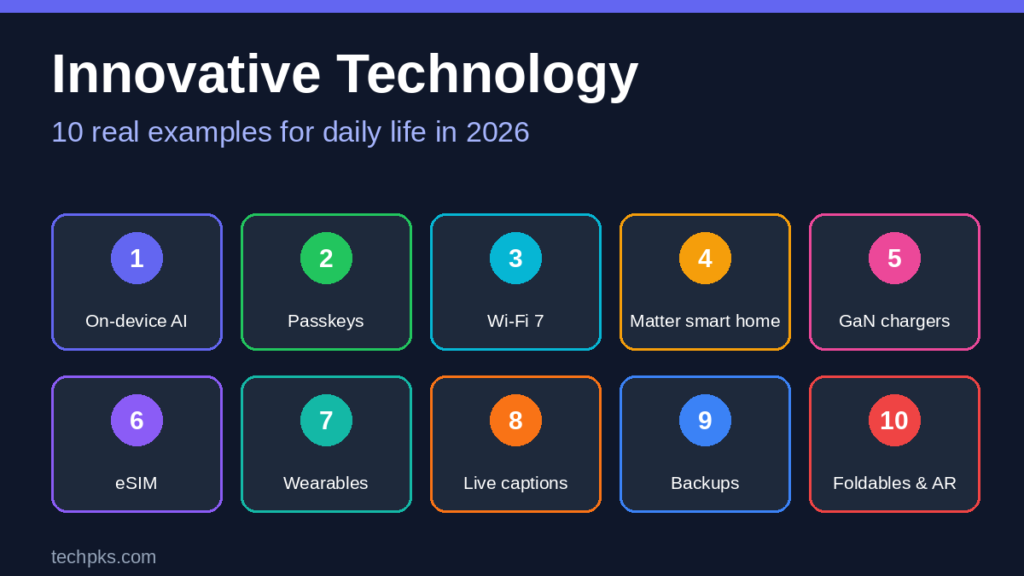
10 Real Examples of Innovative Technology
1. On-Device AI Assistants
Many new phones and laptops now run AI features directly on the device instead of sending every request to the cloud. This can mean faster replies, features that work offline, and less personal data leaving your device. Tasks like summarising text, transcribing audio and editing photos are the most common uses. If you want to try AI image tools without paying, see our list of free AI image generation tools.
Watch out for: features differ a lot between brands, and some still use the cloud for harder tasks.
2. Passkeys
A passkey replaces your password with a cryptographic key stored on your device and unlocked with your fingerprint, face or screen lock. Because there is no password to type, phishing sites cannot steal it. Passkeys are built on standards from the FIDO Alliance and are supported by major platforms. Our step-by-step guide shows what a passkey is and how to set one up.
3. Wi-Fi 7
Wi-Fi 7 (802.11be) adds wider channels on the 6 GHz band and a feature called multi-link operation, which lets a device use more than one band at the same time. In practice it helps most in homes with many devices, video calls and game streaming. You only get the full benefit when both the router and your device support it. The Wi-Fi Alliance explains the certification. If your connection drops today, first try our fix for Wi-Fi connected but no internet, because an old router is not always the cause.
4. Matter Smart Home Standard
Matter is a shared smart home standard that lets devices from different brands work together. Instead of one app per brand, you can control lights, plugs and sensors from the app you already use. It runs over Wi-Fi, Thread and Ethernet. Check the Connectivity Standards Alliance page on Matter to see which device types are supported.
5. GaN Chargers and USB-C Power Delivery
GaN (gallium nitride) chargers are smaller and run cooler than older silicon chargers at the same power. Combined with USB-C Power Delivery, one small charger can power a phone, tablet and many laptops. If you travel often, see our list of tech gadgets to bring when traveling.
6. eSIM
An eSIM is a SIM built into the phone that you activate with a QR code or an app. It lets you add a local data plan abroad without a physical card and switch carriers more easily. Some phones sold in certain countries no longer have a SIM tray at all, so check whether your carrier supports eSIM before you switch.
7. Wearable Health Trackers
Smartwatches and rings track sleep, heart rate and activity over time. Their real value is the trend, not a single reading. They are not medical devices unless the maker says so, so use them to notice changes and talk to a doctor if something looks wrong.
8. Live Captions and Accessibility Tools
Live captions turn speech from calls, videos and meetings into text on the device. They help people who are deaf or hard of hearing, and anyone watching a video without sound. Voice control, screen readers and magnifiers are other accessibility features that now come built in to most phones.
9. Cloud Plus Local Backup
Photos and documents are safest when you follow the 3-2-1 rule: three copies, on two types of storage, with one copy off-site. A cloud service gives you the off-site copy, and an external drive gives you the fast local copy. If you lose files by mistake, our guide on how to recover a deleted file on Windows can help.
10. Foldable Phones and Smart Glasses
Foldables and smart glasses are the newest and least proven examples on this list. They are interesting, but prices are high and the software is still changing. Treat them as something to watch rather than something you need.
Quick Comparison
| Technology | What it replaces | Who benefits most |
| On-device AI | Cloud-only assistants | Anyone who values speed and privacy |
| Passkeys | Passwords and SMS codes | Everyone with online accounts |
| Wi-Fi 7 | Older Wi-Fi 5 and 6 routers | Homes with many devices |
| Matter smart homes | Separate brand-locked apps | Smart home owners |
| GaN chargers | Bulky laptop and phone bricks | Travellers and commuters |
| eSIM | Physical SIM cards | Frequent travellers |
| Wearable health trackers | Occasional check-ups | Fitness and sleep trackers |
| Live captions | Missed audio and video | Deaf and hard-of-hearing users |
| Cloud plus local backup | Single-copy storage | Anyone with irreplaceable files |
| Foldable and AR devices | Standard phones and screens | Early adopters |
Power Banks: A Practical Example of Smart Buying
Power banks are often listed as innovative tech, but many buyers choose them wrongly. Three numbers matter more than the marketing:
- Capacity in Wh, not just mAh. Watt-hours equal mAh multiplied by voltage, divided by 1,000. A 20,000 mAh bank at a typical 3.7 V is about 74 Wh.
- Output wattage. A phone needs about 20 to 30 W. A laptop often needs 45 W or more, so check the USB-C Power Delivery rating.
- Travel limits. Airlines normally require power banks in carry-on bags, and a common limit is 100 Wh per battery. See the FAA guidance on lithium batteries and confirm your airline’s rules.
How to Decide What Is Worth Adopting
- Name the problem. Write down the exact thing that annoys you today, such as weak Wi-Fi or password resets.
- Check compatibility. Make sure the new tool works with your phone, router and apps.
- Check security and updates. Look for a brand that publishes regular security updates.
- Compare the total cost. Include subscriptions, accessories and replacement parts.
- Start small. Try one change at a time so you can see what really helped.
Common Mistakes to Avoid
- Buying a device because it is labelled “AI-powered” without checking what the AI actually does.
- Choosing a smart home brand that does not support Matter.
- Skipping security setup, such as two-step sign-in or passkeys, on new accounts.
- Buying very cheap chargers and power banks without safety certification marks.
- Upgrading hardware when a free software update or a settings change would solve the problem.
Pros and Cons of Adopting New Technology Early
- Pros: you get new features first, and you may save time or money sooner.
- Cons: higher prices, bugs, limited support and a risk that the standard changes.
As a rule, adopt early for low-cost items such as chargers and passkeys, and wait for expensive items such as foldables.
Frequently Asked Questions
What is an example of innovative technology?
Passkeys are a clear example. They replace passwords with a secure key stored on your device, which removes a long-standing security problem.
What is the difference between innovation and new technology?
New technology is anything recently released. Innovation solves a problem in a better way. A new phone with a slightly faster chip is new. A passkey that removes passwords is an innovation.
Is innovative technology always worth buying?
No. Wait if the product is expensive, has weak software support or only works with one brand. Cheap upgrades such as chargers and security tools are usually safe to try early.
Which innovative technology helps most at home?
A good Wi-Fi setup and a Matter-compatible smart home give most households the biggest everyday benefit, while passkeys improve security for everyone.
Conclusion
Innovative technology is worth your attention when it removes a real problem. Start with low-cost, high-value changes such as passkeys, a compact GaN charger and a proper backup routine, then add Wi-Fi 7 or smart home devices if you need them. For more ideas, see our overview of the top 10 technology industries.